Monday, May 22, 2023

Oracle Reports: Generate output into Spreadsheet Excel Format

Oracle Reports: Generate output into Spreadsheet Excel Format


 Most end-users use Excel as a very generic tool, because of their familiarity and the control in analysing data using the power of MS Excel.

Customers request converting lot of reports to excel.
As you can imagine, converting all reports to excel is a mammoth task using BI (XML) Publisher.

There is a trick to capture Oracle Reports output (text output) into a excel sheet.

This trick uses the power of XML and MS Excel to format the data. This is trick is a simple and effective work around.


Basic Steps :
1) Set the output format for the report to XML
2) Run the report to generate output.
3) Save the output file locally as a XML file.
4) Open the file using MS Excel.
5) To make it more beautiful, you may use a MS Excel Template.

The Excel Templates can be used to do complex data analysis and formatting. Displayed example below is a simple excel template, to make the point.

Example URL:

http://127.0.0.1/reports/rwservlet?server=rep_APPSER_FRHome1&report=C:\MYREPORT.rdf&desformat=xml&destype=cache&userid=%77%61%68%2F%77%61%68%40%73%65%72%31%38&paramform=No&maximize=Yes
Oracle Reports: Generate output into Spreadsheet Excel Format

By mentioning destination, you can directly save the xml output into .xls excel file.

Example URL:

http://127.0.0.1/reports/rwservlet?server=rep_APP-SER_FRHome1&report=C:\MYREPORT.rdf&desname=c:\myfile1.xls&desformat=xml&destype=file&userid=%77%61%68%2F%77%61%&paramform=No&maximize=Yes

Oracle Reports: Generate output into Spreadsheet Excel Format


Another Technique is:

1. The SELECT statement should produce a string of data separated by commas.
For example:

select deptno||','||dname||','||loc the_string
from dept;

2. The report must be created as a Character Mode report, and the output
filename must have a .csv extension. Set the following System Parameters
under the Data Model node in the Object Navigator. Make column size large
enough to hold the data.

System Parameter                    Name Initial Value
---------------------------------- ------------------------------

MODE                                           Character
DESTYPE                                     File
DESNAME                                   x.csv
DESFORMAT                              dflt

3. Now, run the report; it will create the output file x.csv.

The file x.csv can be imported into MS Excel. There will be three columns
of data.

NOTE: This information is valid up to, but not including Reports 6.0,
where desformat=delimited, is all that is required.

Tuesday, November 8, 2022

Oracle SQL: Generating Dates in Sequence & Time in Sequence

Oracle SQL: Generating Dates in Sequence & Time in Sequence

 To achieve our task we use connect by level in our SQL to generate the followings:

SQL for Generating Dates in Sequence:

Select To_Date(Sysdate-30, 'dd-mm-rrrr') + (Level - 1) Dates
From Dual
Connect By Level <= ((To_Date(Sysdate, 'dd-mm-rrrr') -
To_Date(Sysdate-30, 'dd-mm-rrrr')) + 1);

Oracle SQL: Generating Dates in Sequence & Time in Sequence

SQL for Generating Time in Sequence:

Select Level,
To_Char(Trunc(Sysdate) + (Level - 1) / 24, 'YYYY-MM-DD HH24:MI') As Date_Hour,
To_Char(Trunc(Sysdate) + (Level - 1) / 24, 'HH24:MI') As Hours
From Dual
Connect By Level <= 24;
Oracle SQL: Generating Dates in Sequence & Time in Sequence

I hope it's helpful for you. If you have any queries, don't hesitate to contact me.

Name : Muhammad Sahal Qasim
E-mail : s.m.sahal789@gmail.com
Thank you.

Friday, October 21, 2022

Exporting a database does not export empty tables

Exporting a database does not export empty tables

Problem

When using the exp utility to export an Oracle database, you may find that not all tables are included in the export.

Cause
Empty tables may not be included in the export, as they have not been allocated space on disk. In versions of Oracle before 11g R2, Oracle allocates space for a table when the table is first created.
After 11g R2, Oracle defaults the option deferred_segment_creation to true, which allocates space for a table when the first row is inserted.
If the tables were created when this option was enabled, tables may be empty and may not exist on disk. Those tables would then subsequently fail to export.
Diagnosis
If the tables were created when this option was enabled, tables may be empty and may not exist on disk. Those tables would then subsequently fail to export.
Run the following query as your database user. If it returns any rows, you are affected, and should proceed with the resolution:
SELECT * FROM user_tables WHERE segment_created = 'NO';
Resolution
Run the following SQL query to generate a list of alter statements:
SELECT 'ALTER TABLE '||table_name||' ALLOCATE EXTENT;' FROM user_tables WHERE segment_created = 'NO';
Run the ALTER statements against your database, and then attempt the export again.

ALTER TABLE <table_name> ALLOCATE EXTENT;

Run below script to create procedure and then execute the procedure in Begin..End to allocate extent to empty tables

Create Or Replace Procedure Allocate_Extent Is
  Cursor c Is
    Select 'ALTER TABLE ' || Table_Name || ' ALLOCATE EXTENT' Script
      From User_Tables
     Where Segment_Created = 'NO';
  m_Sql Varchar2(1000);
Begin
  For i In c Loop
    m_Sql := i.Script;
    Dbms_Output.Put_Line(m_Sql);
    Execute Immediate (m_Sql);
  End Loop;
End;

I hope it's helpful for you. If you have any queries, don't hesitate to contact me.

Name : Muhammad Sahal Qasim
E-mail : s.m.sahal789@gmail.com
Thank you.

Thursday, October 20, 2022

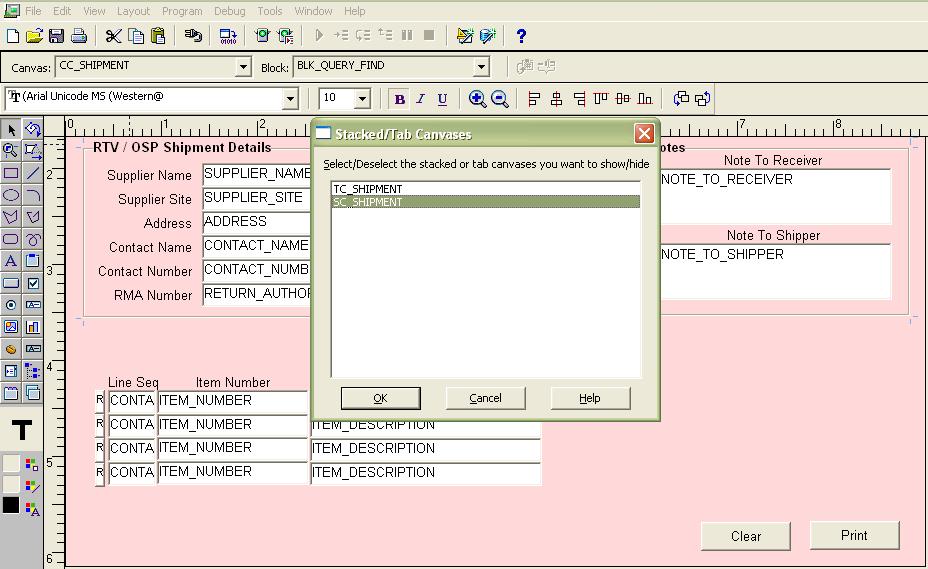
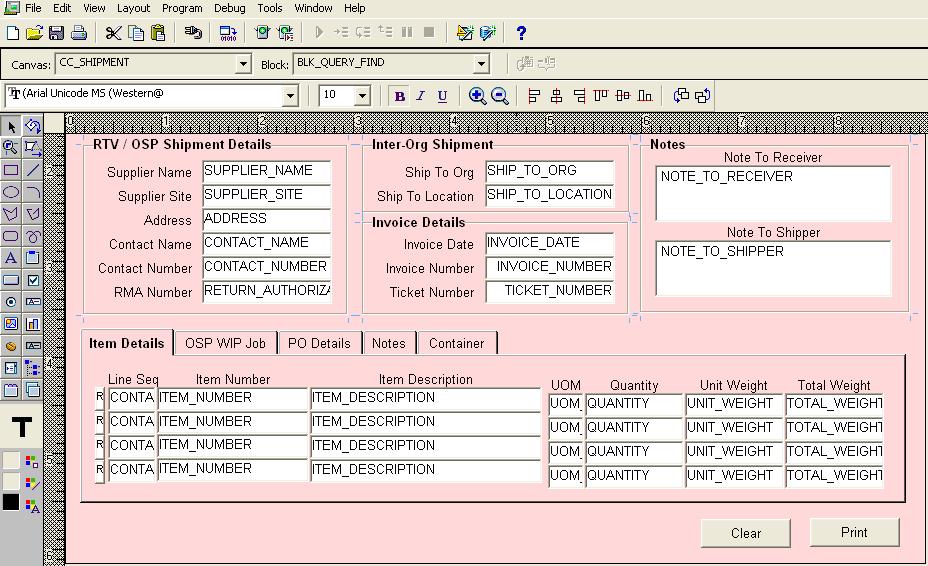
Place the stacked canvas in TAB page canvas

Place the stacked canvas in TAB page canvas

The stacked canvas cannot be placed in the TAB page canvas. However, the stacked canvas may be shown on all/required tab pages.

Example: (Requirement such as this...) we must display the ITEM DETAILS (Line sequence number, item number, and description) on all TAB pages (Item details, OSP WIP Job, PO Details, Container and notes).

As specified, you designed the content and TAB page canvas; when you attempt to construct the stacked canvas, the developer suite will generate an error...

Place the stacked canvas in TAB page canvas

Place the stacked canvas in TAB page canvas

Place the stacked canvas in TAB page canvas

Place the stacked canvas in TAB page canvas

Place the stacked canvas in TAB page canvas

Place the stacked canvas in TAB page canvas

Place the stacked canvas in TAB page canvas

I hope it's helpful for you. If you have any queries, don't hesitate to contact me.

Name : Muhammad Sahal Qasim
E-mail : s.m.sahal789@gmail.com
Thank you.

Friday, August 26, 2022

How to enable/disable case sensitive passwords in Oracle11g?

How to enable/disable case sensitive passwords in Oracle11g?

Case-sensitive passwords are a new security feature introduced in Oracle 10g, however this feature is enabled by default in Oracle 11g.

If you utilise an older version of Oracle Forms (6i in my instance) with an Oracle 11g database, case-sensitive passwords may cause issues. If the passwords don't match, you can't login to the database since the LOGON built-in transmits the password to the database in UPPERCASE.

Oracle 11g requires a modification to the SEC_CASE_SENSITIVE_LOGON startup option in order to deactivate case-sensitive passwords:

Step 1:

SQL> connect sys/oracle as sysdba

Step 2:

SQL> show parameter SEC_CASE_SENSITIVE_LOGON

Step 3:

SQL> sec_case_sensitive_logon       boolean   TRUE

Step 4:

SQL> alter system set sec_case_sensitive_logon=false scope=both;


Revert the value back to true to allow case-sensitive passwords once more.

I hope it's helpful for you. If you have any queries, don't hesitate to contact me.

Name : Muhammad Sahal Qasim
E-mail : s.m.sahal789@gmail.com
Thank you.

Thursday, August 25, 2022

How to delete duplicate rows from a table


How to delete duplicate rows from a table

SQL> SELECT * FROM EMP;

        ID NAME
---------- --------------------
        10 SCOTT
        10 SCOTT
        20 HELLOW WORLD
        30 SMITH
        20 HELLOW WORLD
        30 SMITH

6 rows selected.


SQL> DELETE FROM TEST

WHERE ROWID NOT IN (SELECT MIN (ROWID)

FROM TEST

GROUP BY ID,NAME);

3 rows deleted.


SQL> SELECT * FROM EMP;

        ID NAME
---------- --------------------
        10 SCOTT
        20 HELLOW WORLD
        30 SMITH


SQL> COMMIT;

Commit complete.


I hope it's helpful for you. If you have any queries, don't hesitate to contact me.

Name : Muhammad Sahal Qasim
E-mail : s.m.sahal789@gmail.com

Thank you.

Wednesday, August 24, 2022

Send Email From Oracle Database

Send Email From Oracle Database

 The steps to send emails from an Oracle database are as follows:

Step 1:

CREATE DIRECTORY MYEMAIL AS 'C:\file_data';

GRANT READ,WRITE ON DIRECTORY MYEMAIL TO SCOTT;

Step 2:

CREATE OR REPLACE PROCEDURE send_mail (p_to          IN VARCHAR2,

                                       p_from        IN VARCHAR2,

                                       p_subject     IN VARCHAR2,

                                       p_text_msg    IN VARCHAR2 DEFAULT NULL,

                                       p_attach_name IN VARCHAR2 DEFAULT NULL,

                                       p_attach_mime IN VARCHAR2 DEFAULT NULL,

                                       p_attach_blob IN BLOB DEFAULT NULL,

                                       p_smtp_host   IN VARCHAR2,

                                       p_smtp_port   IN NUMBER DEFAULT 25)


AS

  l_mail_conn   UTL_SMTP.connection;

  l_boundary    VARCHAR2(50) := '----=*#abc1234321cba#*=';

  l_step        PLS_INTEGER  := 12000; -- make sure you set a multiple of 3 not higher than 24573

BEGIN


DBMS_OUTPUT.put_line('TEST1');

DBMS_OUTPUT.put_line('TEST1');

  l_mail_conn := UTL_SMTP.open_connection(p_smtp_host, p_smtp_port);

  UTL_SMTP.helo(l_mail_conn, p_smtp_host);

  UTL_SMTP.mail(l_mail_conn, p_from);

  UTL_SMTP.rcpt(l_mail_conn, p_to);


  UTL_SMTP.open_data(l_mail_conn);


  UTL_SMTP.write_data(l_mail_conn, 'Date: ' || TO_CHAR(SYSDATE, 'DD-MON-YYYY HH24:MI:SS') || UTL_TCP.crlf);

  UTL_SMTP.write_data(l_mail_conn, 'To: ' || p_to || UTL_TCP.crlf);

  UTL_SMTP.write_data(l_mail_conn, 'From: ' || p_from || UTL_TCP.crlf);

  UTL_SMTP.write_data(l_mail_conn, 'Subject: ' || p_subject || UTL_TCP.crlf);

  UTL_SMTP.write_data(l_mail_conn, 'Reply-To: ' || p_from || UTL_TCP.crlf);

  UTL_SMTP.write_data(l_mail_conn, 'MIME-Version: 1.0' || UTL_TCP.crlf);

  UTL_SMTP.write_data(l_mail_conn, 'Content-Type: multipart/mixed; boundary="' || l_boundary || '"' || UTL_TCP.crlf || UTL_TCP.crlf);


  IF p_text_msg IS NOT NULL THEN

    UTL_SMTP.write_data(l_mail_conn, '--' || l_boundary || UTL_TCP.crlf);

    UTL_SMTP.write_data(l_mail_conn, 'Content-Type: text/plain; charset="iso-8859-1"' || UTL_TCP.crlf || UTL_TCP.crlf);


    UTL_SMTP.write_data(l_mail_conn, p_text_msg);

    UTL_SMTP.write_data(l_mail_conn, UTL_TCP.crlf || UTL_TCP.crlf);

  END IF;


  IF p_attach_name IS NOT NULL THEN

    UTL_SMTP.write_data(l_mail_conn, '--' || l_boundary || UTL_TCP.crlf);

    UTL_SMTP.write_data(l_mail_conn, 'Content-Type: ' || p_attach_mime || '; name="' || p_attach_name || '"' || UTL_TCP.crlf);

    UTL_SMTP.write_data(l_mail_conn, 'Content-Transfer-Encoding: base64' || UTL_TCP.crlf);

    UTL_SMTP.write_data(l_mail_conn, 'Content-Disposition: attachment; filename="' || p_attach_name || '"' || UTL_TCP.crlf || UTL_TCP.crlf);


    FOR i IN 0 .. TRUNC((DBMS_LOB.getlength(p_attach_blob) - 1 )/l_step) LOOP

      UTL_SMTP.write_data(l_mail_conn, UTL_RAW.cast_to_varchar2(UTL_ENCODE.base64_encode(DBMS_LOB.substr(p_attach_blob, l_step, i * l_step + 1))));

    END LOOP;


    UTL_SMTP.write_data(l_mail_conn, UTL_TCP.crlf || UTL_TCP.crlf);

  END IF;


  UTL_SMTP.write_data(l_mail_conn, '--' || l_boundary || '--' || UTL_TCP.crlf);

  UTL_SMTP.close_data(l_mail_conn);


  UTL_SMTP.quit(l_mail_conn);

END;

Step 3:

CREATE OR REPLACE FUNCTION loadBlobFromFile(p_file_name VARCHAR2) RETURN BLOB AS

  dest_loc  BLOB := empty_blob();

  src_loc   BFILE := BFILENAME('MYEMAIL', p_file_name);

BEGIN


  -- Open source binary file from OS

 DBMS_LOB.OPEN(src_loc, DBMS_LOB.LOB_READONLY);


  -- Create temporary LOB object

  DBMS_LOB.CREATETEMPORARY(

        lob_loc => dest_loc

      , cache   => true

      , dur     => dbms_lob.session

  );


  -- Open temporary lob

  DBMS_LOB.OPEN(dest_loc, DBMS_LOB.LOB_READWRITE);


  -- Load binary file into temporary LOB

  DBMS_LOB.LOADFROMFILE(

        dest_lob => dest_loc

      , src_lob  => src_loc

      , amount   => DBMS_LOB.getLength(src_loc));


  -- Close lob objects

  DBMS_LOB.CLOSE(dest_loc);

  DBMS_LOB.CLOSE(src_loc);


  -- Return temporary LOB object

  RETURN dest_loc;

END loadBlobFromFile;

Step 4:

DECLARE


  l_blob BLOB;


BEGIN


  SELECT   loadBlobFromFile('ayaz.pdf')

  INTO   l_blob

  FROM   dual;

  send_mail(p_to          => '(Email)@(Domain).com.pk',

            p_from        => '(Email)@(Domain).com.pk',

            p_subject     => 'Message attached',

            p_text_msg    => 'This is a test message',

            p_attach_name => 'abc.pdf',

            p_attach_mime => 'image/gif',

            p_attach_blob => l_blob,

            p_smtp_host   => '(SMTP Email)');

END;


Tuesday, August 23, 2022

Oracle Forms: Avoid duplicated records in a block

Oracle Forms: Avoid duplicated records in a block


Rejecting two records with duplicate values is the goal.

Oracle Forms: Avoid duplicated records in a block

Two computed items are utilised, one in the data block and the other in the control block.

Oracle Forms: Avoid duplicated records in a block

The DEPT block now contains the first computed item (:DEPT.MATCH FOUND). It includes the following formula:

Comparaison(:ctrl.charsave, :dept.deptno||:dept.dname)

Notice in this case,that we want to avoid duplicates on both DEPTNO and DNAME values.

Function COMPARAISON (val1 varchar2, val2 varchar2)

Return number

Is

   answer number := 0;

Begin

   if val1 = val2 then

      answer := 1;

   end if;

   return(answer);

End;


COMPARAISON is a program unit stored in the Forms module.

If the two numbers are equal, the function compares them and returns 1 (a value greater than 0). Otherwise, it returns 0.

The current record's backup value is contained in the first value (:ctrl.charsave).

The DEPT block must be configured with the following properties:

Query all records

Yes


The CTRL block must have the following properties setting:

Query all records

Yes

Single Record

Yes

Database Data Block

No


The second computed item is appended to the CTRL block as ":CTRL.MATCH FOUND".

It summarize the values contained in all the rows of the DEPT block (dept.match_found).

If the total is greater than 1, we have two duplicated data.


I hope it's helpful for you. If you have any queries, don't hesitate to contact me.

Name : Muhammad Sahal Qasim
E-mail : s.m.sahal789@gmail.com

Thank you.

Thursday, July 7, 2022

Configure oracle reports 12c


Step 01:

Now, in order to develop Report Components, we will utilize WLST, which stands for Weblogic Scripting Tool.

  • We are going to develop a Reports tool for the Machine called "AdminServerMachine" and call it [reportsToolsName].
  • We are going to create a Reports server for the machine called ‘AdminServerMachine’, and its name will be <reportsServerName>.

From the following location, run the WLST.cmd command.

  • C:\Oracle\Middleware\Oracle_Home\oracle_common\common\bin\WLST.cmd

In the WLST Window, type the commands that are shown below.

  • connect("weblogic",<"WeblogicPassword">, "localhost:7001")

Now In order to generate report tools, please type the following command.

  •  createReportsToolsInstance(instanceName=’RepTools1’, machine=’AdminServerMachine’)
  • createReportsServerInstance(instanceName=’MyServer1’, machine=’AdminServerMachine’)
  • exit()

Now your Reports Tool and Server is created.

Step 02:

Launching WLS REPORTS is the next step. To run this command, open the command prompt and type in the following.

  • C:\Oracle\Middleware\Oracle_Home\user_projects\domains\base_domain\bin\startManagedWebLogic.cmd WLS_REPORTS

Launch the Report Builder by navigating to the following location.


I have developed a straightforward report using the HR. Country table.

I hope it's helpful for you. If you have any queries, don't hesitate to contact me.

Name : Muhammad Sahal Qasim
E-mail : s.m.sahal789@gmail.com

Thank you.

Tuesday, July 5, 2022

Changing Listener Port for Oracle Database

Changing Listener Port for Oracle Database


 1. Change listener.ora


 LISTENER =
  (DESCRIPTION_LIST =
    (DESCRIPTION =
      (ADDRESS = (PROTOCOL = IPC)(KEY = EXTPROC1))
      (ADDRESS = (PROTOCOL = TCP)(HOST = 10.11.201.198)(PORT = 1523))
    )
  )

2. Connect to sys as sysdba

3. execute the following command:

    ALTER SYSTEM SET LOCAL_LISTENER = "(ADDRESS=(PROTOCOL=TCP)(HOST=10.11.201.198)(PORT=1523))";

4. execute the following command:


    ALTER SYSTEM REGISTER;


I hope it's helpful for you. If you have any queries, don't hesitate to contact me.

Name : Muhammad Sahal Qasim
E-mail : s.m.sahal789@gmail.com

Thank you.